useHighlightContext
The useHighlightContext hook in React PDF Kit grants access to the state and functions for managing highlighted keywords.
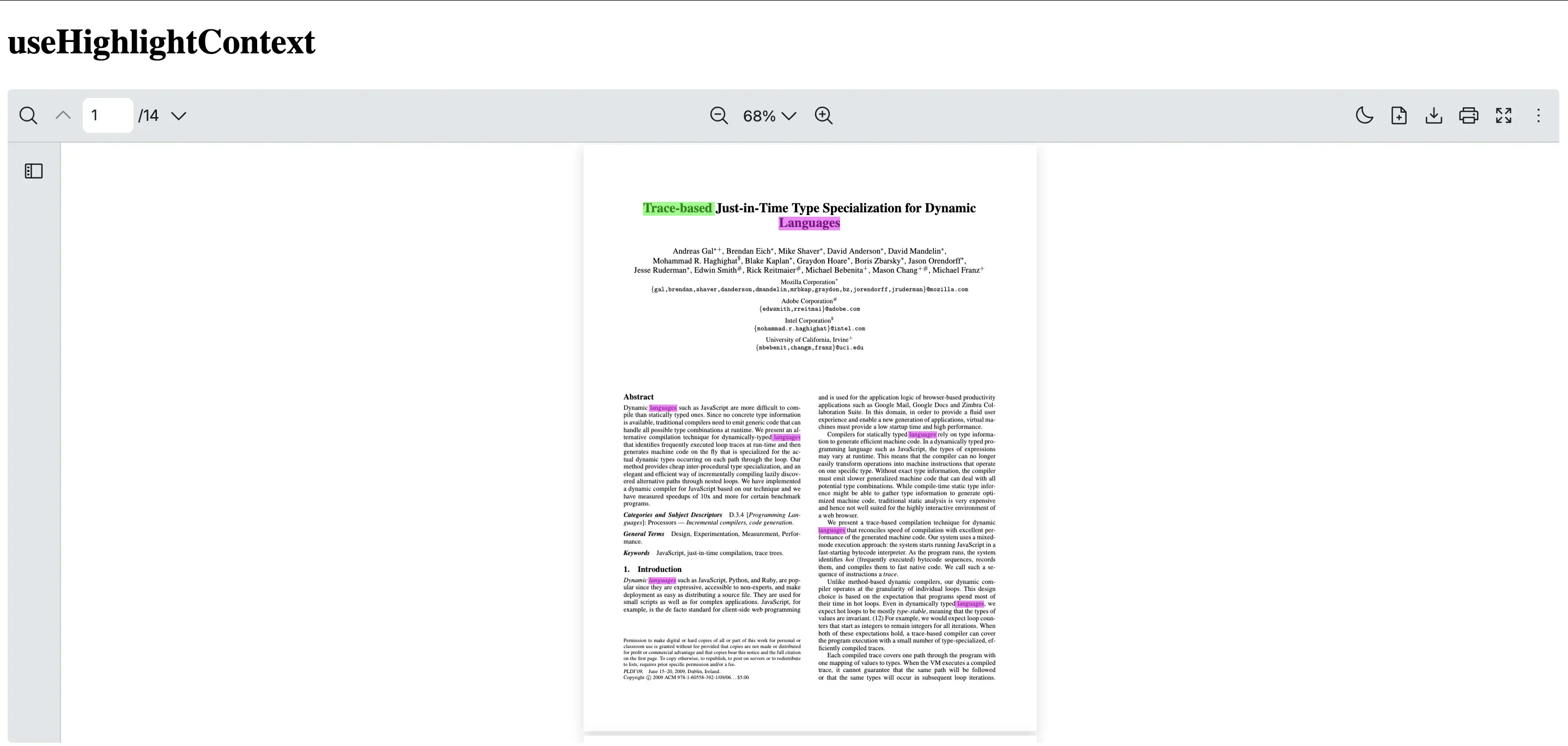
It enables text highlighting on multiple keywords in different colors within a React PDF Viewer component while providing convenient state management and control functions.
Note: If you are looking to highlight a single keyword or string and navigate to the first occurrence, useSearchContext is recommended.
Return Type
Section titled “Return Type”| Name | Type | Description |
|---|---|---|
| highlight | (value: TextHighlight[]) => Promise<void> | Highlight specified keyword(s) (as strings or regular expression patterns) in the PDF document with customizable options |
| highlightKeywords | TextHighlight[] | Provide the highlight keywords information eg. keyword, highlight color, options |
| highlightMatches | MatchHighlight[] | Provide the highlight matches information eg. page number, highlighted texts position |
| clear | () => void | Removes all existing highlights from the PDF document |
To ensure the highlight context can be accessed, you will need to use useHighlightContext inside a component which is a child of RPProvider.
This example shows how to create a HighlightWords component that utilizes useHighlightContext hook to manage the state and functions for highlighting words.
NOTE: Ensure that the
highlightColorvalue includes opacity so the highlighted text remains visible.
import {  RPConfig,  RPProvider,  RPLayout,  RPPages,  useHighlightContext} from '@react-pdf-kit/viewer'import { useEffect } from 'react'
const HighlightWords = () => {  const { highlight } = useHighlightContext()  useEffect(() => {    highlight([      {        keyword: 'Trace-based',        highlightColor: 'rgba(0, 255, 0, 0.5)',        options: { matchCase: true, wholeWords: true }      },      {        // This regular expression matches the word "Languages" in a case-insensitive manner        keyword: /Languages/gi,        highlightColor: 'rgba(255, 0, 255, 0.5)'      }    ])  }, [highlight])  return <>{/* You can add UI elements here */}</>}
export const AppPdfViewer = () => {  return (    <RPConfig licenseKey="YOUR_DOMAIN_TOKEN">      <RPProvider src="https://raw.githubusercontent.com/mozilla/pdf.js/ba2edeae/web/compressed.tracemonkey-pldi-09.pdf">        <HighlightWords />        <RPLayout toolbar>          <RPPages />        </RPLayout>      </RPProvider>    </RPConfig>  )}
import { RPConfig, RPProvider, RPLayout, RPPages, useHighlightContext} from '@react-pdf-kit/viewer'import { useEffect, type FC } from 'react'
const HighlightWords: FC = () => { const { highlight } = useHighlightContext() useEffect(() => { highlight([ { keyword: 'Trace-based', highlightColor: 'rgba(0, 255, 0, 0.5)', options: { matchCase: true, wholeWords: true } }, { // This regular expression matches the word "Languages" in a case-insensitive manner keyword: /Languages/gi, highlightColor: 'rgba(255, 0, 255, 0.5)' } ]) }, [highlight]) return <>{/* You can add UI elements here */}</>}
export const AppPdfViewer: FC = () => { return ( <RPConfig licenseKey="YOUR_DOMAIN_TOKEN"> <RPProvider src="https://raw.githubusercontent.com/mozilla/pdf.js/ba2edeae/web/compressed.tracemonkey-pldi-09.pdf"> <HighlightWords /> <RPLayout toolbar> <RPPages /> </RPLayout> </RPProvider> </RPConfig> )}