

Customize a Search Popover
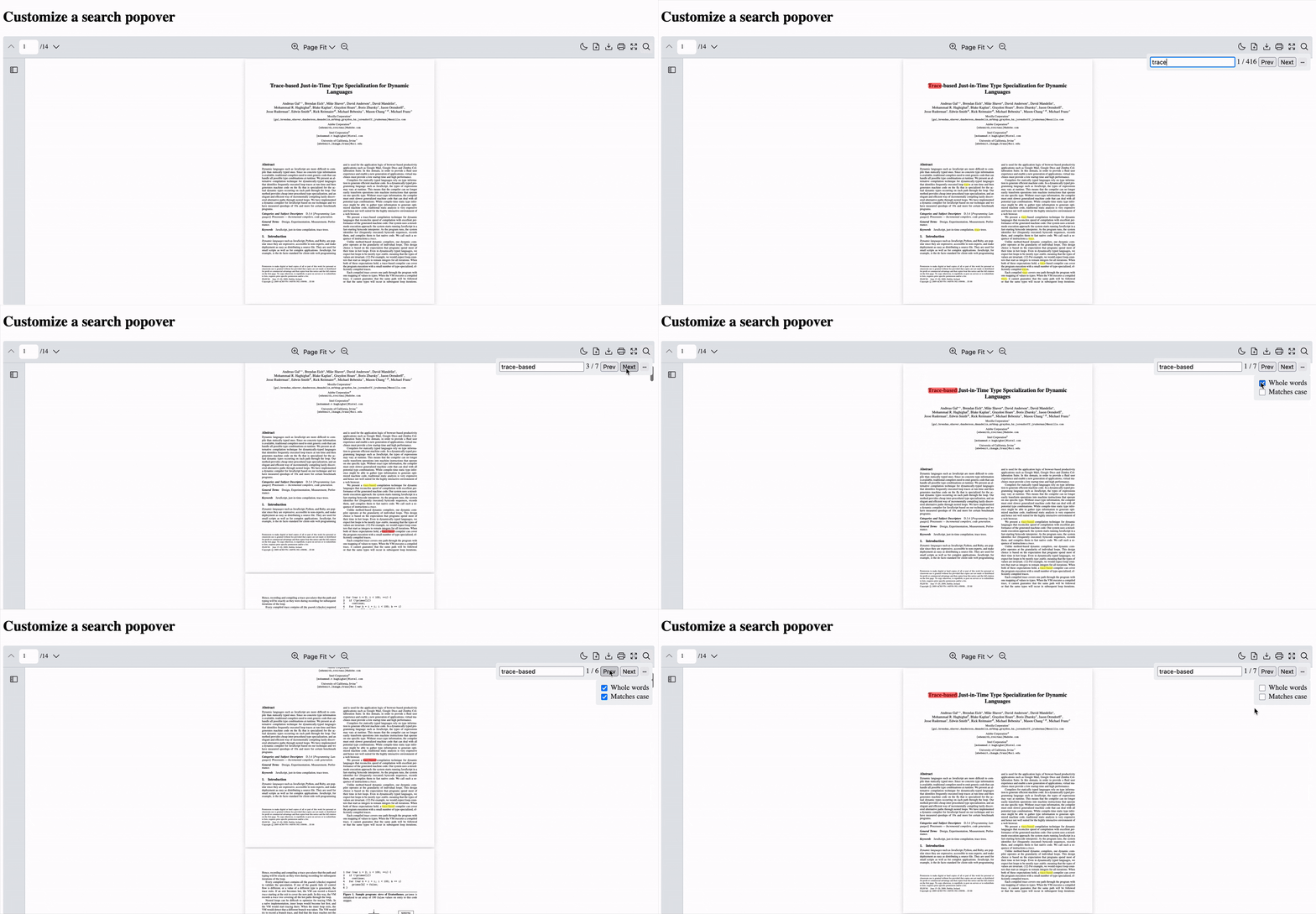
Scenario
Section titled “Scenario”Create a custom search functionality with a popover interface in React PDF Kit. The popover will include a search input field and additional options like “whole words” and “match case” filtering.
What to Use
Section titled “What to Use”The useSearchContext hook provides access to the search functionality and configuration of the React PDF Viewer component. Use this hook to control search behavior and query updates.
Here are the key concepts we’re using for this example
| Name | Objective |
|---|---|
setSearch | Function to update the search query |
setSearchOptions | Function to configure search behavior (wholeWords, matchCase) |
currentMatchPosition | Tracks which match is currently highlighted |
totalMatches | Shows the total number of search results found |
prevMatch | Function to go to the previous search result |
nextMatch | Function to go to the next search result |
To make the search popover experience smooth, you’ll want these 5 components:
Notes: This example will be using
RPLayoutwith Individual Tools. Please refer toRPLayoutfor more information.
-
Create a custom search icon component
Icon.jsx export const SearchIcon = () => {return (<svg xmlns="http://www.w3.org/2000/svg" x="0px" y="0px" viewBox="0 0 30 30"><path d="M 13 3 C 7.4889971 3 3 7.4889971 3 13 C 3 18.511003 7.4889971 23 13 23 C 15.396508 23 17.597385 22.148986 19.322266 20.736328 L 25.292969 26.707031 A 1.0001 1.0001 0 1 0 26.707031 25.292969 L 20.736328 19.322266 C 22.148986 17.597385 23 15.396508 23 13 C 23 7.4889971 18.511003 3 13 3 z M 13 5 C 17.430123 5 21 8.5698774 21 13 C 21 17.430123 17.430123 21 13 21 C 8.5698774 21 5 17.430123 5 13 C 5 8.5698774 8.5698774 5 13 5 z"></path></svg>);}export const MoreOptionsIcon = () => {return (<><svgfill="#000000"viewBox="0 0 32 32"id="Outlined"xmlns="http://www.w3.org/2000/svg"><g id="SVGRepo_bgCarrier" stroke-width="0"></g><gid="SVGRepo_tracerCarrier"stroke-linecap="round"stroke-linejoin="round"></g><g id="SVGRepo_iconCarrier">{" "}<title></title>{" "}<g id="Fill">{" "}<path d="M16,13a3,3,0,1,0,3,3A3,3,0,0,0,16,13Zm0,4a1,1,0,1,1,1-1A1,1,0,0,1,16,17Z"></path>{" "}<path d="M24,13a3,3,0,1,0,3,3A3,3,0,0,0,24,13Zm0,4a1,1,0,1,1,1-1A1,1,0,0,1,24,17Z"></path>{" "}<path d="M8,13a3,3,0,1,0,3,3A3,3,0,0,0,8,13Zm0,4a1,1,0,1,1,1-1A1,1,0,0,1,8,17Z"></path>{" "}</g>{" "}</g></svg></>);};Icon.tsx import { FC } from "react";export const SearchIcon : FC = () => {return (<svg xmlns="http://www.w3.org/2000/svg" x="0px" y="0px" viewBox="0 0 30 30"><path d="M 13 3 C 7.4889971 3 3 7.4889971 3 13 C 3 18.511003 7.4889971 23 13 23 C 15.396508 23 17.597385 22.148986 19.322266 20.736328 L 25.292969 26.707031 A 1.0001 1.0001 0 1 0 26.707031 25.292969 L 20.736328 19.322266 C 22.148986 17.597385 23 15.396508 23 13 C 23 7.4889971 18.511003 3 13 3 z M 13 5 C 17.430123 5 21 8.5698774 21 13 C 21 17.430123 17.430123 21 13 21 C 8.5698774 21 5 17.430123 5 13 C 5 8.5698774 8.5698774 5 13 5 z"></path></svg>);}export const MoreOptionsIcon : FC = () => {return (<><svgfill="#000000"viewBox="0 0 32 32"id="Outlined"xmlns="http://www.w3.org/2000/svg"><g id="SVGRepo_bgCarrier" stroke-width="0"></g><gid="SVGRepo_tracerCarrier"stroke-linecap="round"stroke-linejoin="round"></g><g id="SVGRepo_iconCarrier">{" "}<title></title>{" "}<g id="Fill">{" "}<path d="M16,13a3,3,0,1,0,3,3A3,3,0,0,0,16,13Zm0,4a1,1,0,1,1,1-1A1,1,0,0,1,16,17Z"></path>{" "}<path d="M24,13a3,3,0,1,0,3,3A3,3,0,0,0,24,13Zm0,4a1,1,0,1,1,1-1A1,1,0,0,1,24,17Z"></path>{" "}<path d="M8,13a3,3,0,1,0,3,3A3,3,0,0,0,8,13Zm0,4a1,1,0,1,1,1-1A1,1,0,0,1,8,17Z"></path>{" "}</g>{" "}</g></svg></>);}; -
Create a custom search popover component
SearchPopover.jsx import { useSearchContext } from "@react-pdf-kit/viewer";import { useState } from "react";import { MoreOptionsIcon } from "./Icon";const SearchOptions = () => {const { setSearchOptions } = useSearchContext();return (<divstyle={{position: "absolute",minWidth: "max-content",zIndex: 5,top: "100%",right: 0,backgroundColor: "#f1f2f4",padding: "8px",borderRadius: "4px",}}><div style={{ display: "flex", alignItems: "center", gap: "4px" }}><inputtype="checkbox"onClick={() =>setSearchOptions((val) => ({ ...val, wholeWords: !val.wholeWords }))}/><label>Whole words</label></div><div style={{ display: "flex", alignItems: "center", gap: "4px" }}><inputtype="checkbox"onClick={() =>setSearchOptions((val) => ({ ...val, matchCase: !val.matchCase }))}/><label>Matches case</label></div></div>);export const SearchPopover = () => {const {setSearch,currentMatchPosition,totalMatches,prevMatch,nextMatch,} = useSearchContext();const [isOpen, setIsOpen] = useState(false);return (<divstyle={{position: "absolute",minWidth: "max-content",zIndex: 5,top: "100%",right: 0,backgroundColor: "#f1f2f4",padding: "8px",display: "flex",borderRadius: "4px",alignItems: "center",gap: "4px",}}><inputplaceholder="...Search"style={{ height: "100%" }}onChange={(e) => setSearch(e.target.value)}/><span>{currentMatchPosition} / {totalMatches}</span><button onClick={prevMatch}>Prev</button><button onClick={nextMatch}>Next</button><buttonstyle={{position: "relative",width: "20px",height: "20px",padding: "4px",cursor: "pointer",borderRadius: "4px",border: 0,}}onClick={() => setIsOpen((prevValue) => !prevValue)}><MoreOptionsIcon /></button>{isOpen && <SearchOptions />}</div>);};SearchPopover.tsx import { useSearchContext } from "@react-pdf-kit/viewer";import { useState , FC } from "react";import { MoreOptionsIcon } from "./Icon";const SearchOptions : FC = () => {const { setSearchOptions } = useSearchContext();return (<divstyle={{position: "absolute",minWidth: "max-content",zIndex: 5,top: "100%",right: 0,backgroundColor: "#f1f2f4",padding: "8px",borderRadius: "4px",}}><div style={{ display: "flex", alignItems: "center", gap: "4px" }}><inputtype="checkbox"onClick={() =>setSearchOptions((val) => ({ ...val, wholeWords: !val.wholeWords }))}/><label>Whole words</label></div><div style={{ display: "flex", alignItems: "center", gap: "4px" }}><inputtype="checkbox"onClick={() =>setSearchOptions((val) => ({ ...val, matchCase: !val.matchCase }))}/><label>Matches case</label></div></div>);export const SearchPopover : FC = () => {const {setSearch,currentMatchPosition,totalMatches,prevMatch,nextMatch,} = useSearchContext();const [isOpen, setIsOpen] = useState<boolean>(false);return (<divstyle={{position: "absolute",minWidth: "max-content",zIndex: 5,top: "100%",right: 0,backgroundColor: "#f1f2f4",padding: "8px",display: "flex",borderRadius: "4px",alignItems: "center",gap: "4px",}}><inputplaceholder="...Search"style={{ height: "100%" }}onChange={(e) => setSearch(e.target.value)}/><span>{currentMatchPosition} / {totalMatches}</span><button onClick={prevMatch}>Prev</button><button onClick={nextMatch}>Next</button><buttonstyle={{position: "relative",width: "20px",height: "20px",padding: "4px",cursor: "pointer",borderRadius: "4px",border: 0,}}onClick={() => setIsOpen((prevValue) => !prevValue)}><MoreOptionsIcon /></button>{isOpen && <SearchOptions />}</div>);}; -
Create a custom search tool component from the custom search icon and custom search popover components
CustomSearchTool.jsx import { useState } from "react";import { SearchIcon } from "./Icon";import { SearchPopover } from "./SearchPopover";export const CustomSearchTool = () => {const [isOpen, setIsOpen] = useState(false);return (<divstyle={{position: "relative",}}><buttonstyle={{position: "relative",width: "28px",height: "28px",padding: "4px",cursor: "pointer",borderRadius: "4px",border: 0,}}onClick={() => setIsOpen((prevValue) => !prevValue)}><SearchIcon /></button>{isOpen && <SearchPopover />}</div>);};CustomSearchTool.tsx import { FC, useState } from "react";import { SearchIcon } from "./Icon";import { SearchPopover } from "./SearchPopover";export const CustomSearchTool: FC = () => {const [isOpen, setIsOpen] = useState<boolean>(false);return (<divstyle={{position: "relative",}}><buttonstyle={{position: "relative",width: "28px",height: "28px",padding: "4px",cursor: "pointer",borderRadius: "4px",border: 0,}}onClick={() => setIsOpen((prevValue) => !prevValue)}><SearchIcon /></button>{isOpen && <SearchPopover />}</div>);}; -
Create a custom horizontal toolbar component
CustomHorizontalTool.jsx import {FileDownloadTool,FileUploadTool,FullScreenTool,InputPageTool,NextPageTool,PreviousPageTool,PrintTool,ThemeSwitcherTool,ZoomInTool,ZoomLevelTool,ZoomOutTool,} from "@react-pdf-kit/viewer";import { CustomSearchTool } from "./CustomSearchTool";export const CustomHorizontalBar = () => {return (<><PreviousPageTool /><InputPageTool /><NextPageTool /><div style={{ marginLeft: "auto" }}><ZoomInTool /></div><ZoomLevelTool /><ZoomOutTool /><div style={{ marginLeft: "auto" }} /><ThemeSwitcherTool /><FileUploadTool /><FileDownloadTool /><PrintTool /><FullScreenTool /><CustomSearchTool /></>);};CustomHorizontalTool.tsx import {FileDownloadTool,FileUploadTool,FullScreenTool,InputPageTool,NextPageTool,PreviousPageTool,PrintTool,ThemeSwitcherTool,ZoomInTool,ZoomLevelTool,ZoomOutTool,} from "@react-pdf-kit/viewer";import { FC } from "react";import { CustomSearchTool } from "./CustomSearchTool";export const CustomHorizontalBar : FC = () => {return (<><PreviousPageTool /><InputPageTool /><NextPageTool /><div style={{ marginLeft: "auto" }}><ZoomInTool /></div><ZoomLevelTool /><ZoomOutTool /><div style={{ marginLeft: "auto" }} /><ThemeSwitcherTool /><FileUploadTool /><FileDownloadTool /><PrintTool /><FullScreenTool /><CustomSearchTool /></>);}; -
Configure the custom horizontal toolbar component to the React PDF Viewer component
CustomHorizontalToolbar.jsx import {RPLayout,RPPages,RPProvider,RPVerticalBar,RPConfig,} from "@react-pdf-kit/viewer";import { CustomHorizontalBar } from "./CustomHorizontalBar";const App = () => {return (<div><RPConfig><RPProvider src="https://raw.githubusercontent.com/mozilla/pdf.js/ba2edeae/web/compressed.tracemonkey-pldi-09.pdf"><div><RPLayouttoolbar={{topbar: { component: <CustomHorizontalBar /> },leftSidebar: { component: <RPVerticalBar /> },}}><RPPages /></RPLayout></div></RPProvider></RPConfig></div>);};export default AppCustomHorizontalToolbar.tsx import {RPLayout,RPPages,RPProvider,RPVerticalBar,RPConfig,} from "@react-pdf-kit/viewer";import { CustomHorizontalBar } from "./CustomHorizontalBar";const App = () => {return (<div><RPConfig><RPProvider src="https://raw.githubusercontent.com/mozilla/pdf.js/ba2edeae/web/compressed.tracemonkey-pldi-09.pdf"><div><RPLayouttoolbar={{topbar: { component: <CustomHorizontalBar /> },leftSidebar: { component: <RPVerticalBar /> },}}><RPPages /></RPLayout></div></RPProvider></RPConfig></div>);};export default App
Notes
- The CustomHorizontalBar component uses local state (isOpen) to control the visibility of the search popover
- The SearchPopover component also maintains its own state for the options menu visibility
- The
zIndex: 5ensures popovers appear above other content